
Grounding AI in reality with Retrieval-Augmented Generation
If you've tried building with LLMs, you've hit this wall: your carefully crafted AI chatbot confidently tells users that your company's return policy is 90 days when it's actually 30. Or it invents product features that don't exist. Or it can't answer questions about documents you uploaded yesterday because its training data ended months ago.
The traditional fix? Fine-tune the model on your data. That costs thousands of dollars, takes days or weeks, and becomes outdated the moment your knowledge base changes. There's a better way that's become the de facto standard for grounding AI in reality: Retrieval-Augmented Generation, or RAG.
Here's the core idea: instead of expecting your LLM to memorize everything, give it the ability to look things up. When a user asks a question, the system searches your documents, finds the relevant passages, and hands them to the LLM as context. The LLM then generates an answer based on that specific, current information - not whatever it vaguely remembers from training data.
Think of it like the difference between asking someone to recite a book from memory versus letting them check the actual book first. One approach leads to confident mistakes; the other leads to accurate answers grounded in the source material.
Why RAG exists: the limitations it actually solves
Large language models like GPT-4 or Claude are trained on massive datasets - billions of documents scraped from the internet. This gives them broad knowledge, but it comes with serious limitations that matter in production.
The knowledge cutoff problem. Training an LLM is expensive and time-consuming, so models have a knowledge cutoff date. Claude's knowledge cuts off in January 2025. Ask it what happened in February? It literally cannot know without external information. For fast-changing domains like tech, finance, or news, this makes base models nearly useless.
The hallucination problem. When LLMs don't know something, they don't say "I don't know" - they make something up. The technical term is "hallucination," and it's not a bug, it's how these models fundamentally work. They generate the most probable next token based on patterns in their training data. If the pattern looks confident, the output sounds confident, whether it's accurate or not.
The private data problem. Your company's internal documents, customer data, proprietary research - none of that was in the model's training data. You can't ask GPT-4 about last quarter's sales figures or your internal API documentation because it has no way to access that information.
Fine-tuning helps, but it's like teaching someone by making them memorize facts. It's expensive (often thousands of dollars per run), slow (days to complete), and needs to be redone every time your data changes. For most applications, it's overkill.
RAG solves all three problems by keeping knowledge external. Your documents stay in a database. When someone asks a question, the system retrieves relevant passages and includes them in the prompt. The model sees the current, accurate information right there in context and answers based on it. When your data changes, you update the database - no retraining required.
This is why RAG has become the standard approach for production LLM applications. It's not the only technique, but it's the one that actually ships.
How RAG actually works: the basic pipeline
Strip away the hype and RAG is conceptually straightforward. There are two main phases: indexing (preparing your data) and retrieval (using it to answer queries).
The indexing phase happens once upfront, or whenever your data changes:
- Chunk your documents. Break large documents into smaller pieces, typically 256-1024 tokens each. If you're working with a 50-page PDF, you might split it into 200 chunks. Why? Because you want to retrieve specific, relevant passages - not entire documents. Think of it like creating an index in a book versus just handing someone the whole book.
- Generate embeddings. Pass each chunk through an embedding model (like OpenAI's text-embedding-3-small or Cohere's embed-v4). This converts the text into a high-dimensional vector - typically 768 to 1536 numbers that represent the semantic meaning of the text. Similar chunks have similar vectors. This is the key that makes semantic search work.
- Store in a vector database. Save these embeddings in a specialized database (Pinecone, Qdrant, Weaviate, Chroma) that's optimized for similarity search. Traditional databases match exact text; vector databases find semantically similar content, even if the words are different.
The retrieval phase happens every time a user asks a question:
- Embed the query. Take the user's question and run it through the same embedding model. Now you have a vector representing what they're asking about.
- Search for similar chunks. Query your vector database to find the chunks with embeddings most similar to the query vector. The database returns your top 3-5 most relevant passages. This is fast - typically under 50 milliseconds.
- Construct the augmented prompt. Take those retrieved chunks and include them in the prompt you send to the LLM: "Here are some relevant documents: [chunks]. Now answer this question based on these documents: [user query]."
- Generate the response. The LLM reads the context you provided and generates an answer grounded in those specific passages.
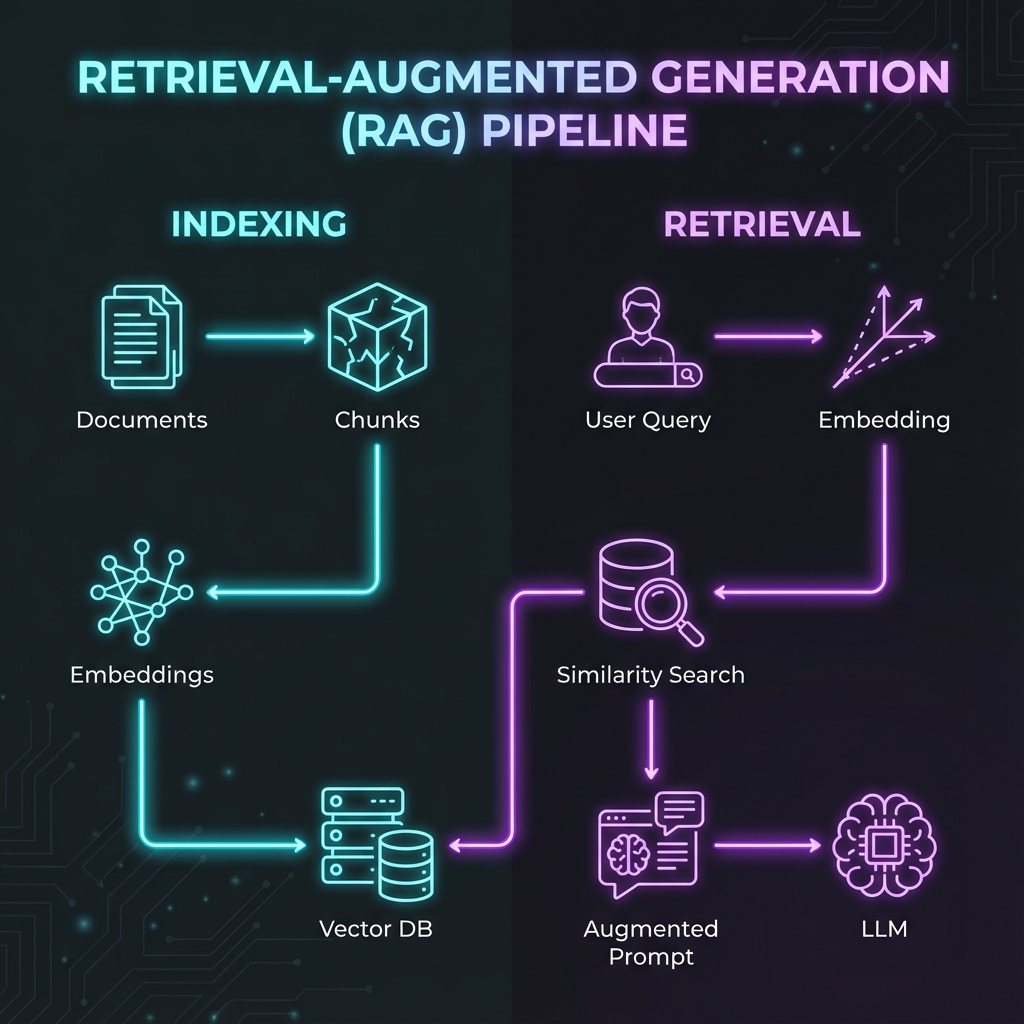
That's it. The whole pipeline is basically: chunk → embed → store → search → augment → generate.
The chunking decision: why it matters more than you think
Most people skip past chunking strategy like it's a minor detail. It's not. How you chunk your documents directly determines what your system can retrieve, and what it can retrieve determines what it can answer accurately.
The problem with naive chunking is that you lose context. Imagine splitting this text every 500 characters:
"The Q3 revenue grew 23% year-over-year to $45M. This exceeded our
projections.

Our enterprise segment drove the growth, with new contracts from
three Fortune 500 companies. The consumer segment remained flat."
If you split at 500 characters, "This exceeded our projections" ends up in one chunk and "Our enterprise segment drove the growth" in another. When someone asks "Why did revenue exceed projections?", the system retrieves the first chunk that says "exceeded projections" but doesn't have the context about enterprise growth.
Common chunking strategies:
- Fixed size: Split every N tokens (e.g., 512 tokens per chunk). Fast and simple, but breaks semantic meaning. Like cutting a book every 10 pages regardless of chapter boundaries.
- Recursive character: Try to split at natural boundaries (paragraphs, then sentences, then tokens) but stay within your size limit. This is LangChain's default and works well for most documents.
- Semantic chunking: Use the embedding model itself to detect topic changes. Embed each sentence, compare consecutive embeddings, and split when similarity drops. Slower and costs more (you're calling the embedding API for every sentence), but preserves meaning better.
- Document structure: For structured content (legal docs, technical manuals, API documentation), chunk by existing structure - sections, subsections, individual API endpoints. Works best when your documents have clear organizational hierarchy.
The optimal chunk size is usually 256-512 tokens for focused retrieval, or 512-1024 if you need more context. You typically want 10-20% overlap between chunks to avoid cutting important information at boundaries.
There's no universally correct answer - it depends on your documents and queries. The pattern recognition article in your knowledge base works better with paragraph-level chunks. Your API reference works better split by endpoint. Test different strategies with your actual data and measure retrieval quality.
Vector databases: where your knowledge actually lives
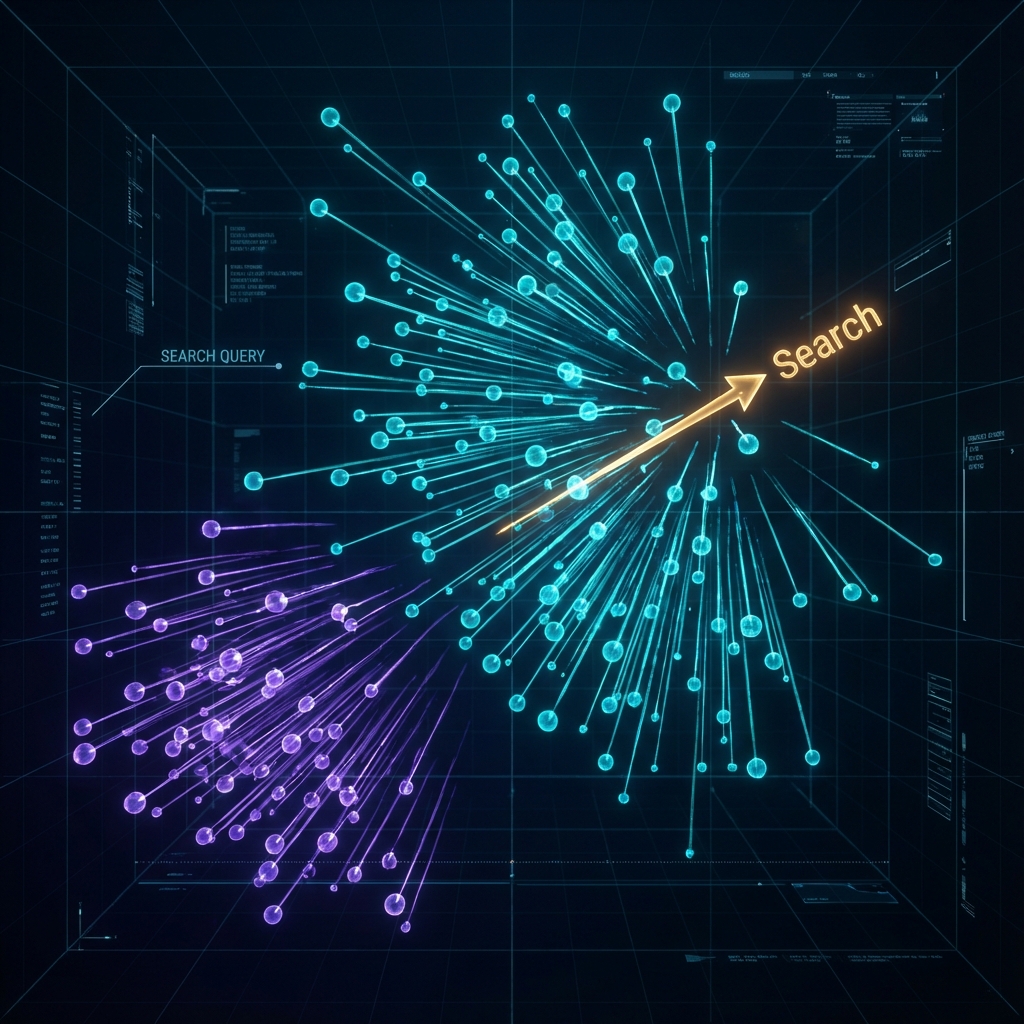
Your vector database is the engine that makes RAG fast enough for production. Traditional databases store and retrieve exact matches. Vector databases store numerical representations of meaning and find similar content, even when the words don't match.
When someone searches for "reset my password," a keyword search only finds chunks containing those exact words. A vector search also finds chunks about "account recovery," "forgotten credentials," and "authentication issues" - semantically related concepts expressed differently.
The main options in 2025:
Pinecone is the fully managed, pay-as-you-go option. You upload your vectors via API, and Pinecone handles all the infrastructure. Search is consistently fast (<50ms), it scales automatically, and you don't manage servers. The tradeoff is cost - expect $500+/month for serious usage - and vendor lock-in. If you want to focus on building your application and not managing databases, Pinecone is the default choice.
Qdrant is open source with a managed option. Written in Rust for performance, it's faster than most alternatives on benchmarks and offers powerful metadata filtering. You can self-host for free or use their cloud service. Popular with cost-conscious teams who want performance without Pinecone's pricing. Strong all-around option.
Weaviate is open source with strong hybrid search capabilities - combining vector similarity with keyword search and graph-based queries. If you're building something that needs both semantic and exact matching (common in enterprise search), Weaviate handles this well. The GraphQL API is different from the REST APIs most databases use, so there's a learning curve.
Chroma is the lightweight option for development and prototyping. Install it with pip, run it locally, and you're done in minutes. Perfect for proofs of concept or small applications. Not recommended for production at scale - it doesn't have the performance optimizations or operational features of the others - but excellent for learning and experimentation.
Milvus is built for massive scale. If you're indexing billions of vectors across distributed clusters, Milvus handles it. Overkill for most applications but essential if you're at that scale. Requires more operational expertise to run.
For prototyping, start with Chroma. For production, Qdrant or Pinecone depending on your preference for self-hosting versus managed services. Most teams using RAG in production have settled on one of these paths.
Frameworks: the tools that wire everything together
You could build RAG from scratch - call the embedding API, manage your vector database, construct prompts manually. Some teams do this for maximum control. Most teams use a framework that handles the plumbing so you can focus on your application.
LangChain is the Swiss Army knife of LLM applications. It's not just for RAG - it handles agents, chains, tool calling, memory, and dozens of integrations. If you need to orchestrate complex workflows (RAG + web search + API calls + business logic), LangChain provides the abstractions. The tradeoff is complexity - there's a learning curve, and simple things sometimes require more code than building from scratch. Think of it like Express.js for LLM apps: flexible and powerful, but you need to understand its patterns.
LlamaIndex is laser-focused on RAG. It provides specialized data loaders (PDFs, APIs, databases, Notion, Google Drive), multiple indexing strategies, and query engines optimized for retrieval. If your application is primarily about querying documents, LlamaIndex's abstractions fit naturally. It's generally faster to get started with than LangChain for pure RAG use cases. Benchmarks show ~40% faster document retrieval in some tests, though this varies based on your setup.
The practical distinction: LangChain is better if you're building applications that do more than RAG - agents that use multiple tools, complex decision trees, workflows with conditional logic. LlamaIndex is better if document retrieval quality is your main concern and you want opinionated defaults that work. Many teams use both: LlamaIndex for the RAG pipeline, LangChain for orchestration around it.
A basic RAG pipeline with LlamaIndex looks like this:
from llama_index import VectorStoreIndex, SimpleDirectoryReader

# Load documents
documents = SimpleDirectoryReader('data').load_data()

# Create index (chunks, embeds, stores)
index = VectorStoreIndex.from_documents(documents)

# Query
query_engine = index.as_query_engine()
response = query_engine.query("What were Q3 revenue figures?")
That's about 10 lines to a working RAG system. The framework handles chunking, embedding, storage, retrieval, and prompt construction. You focus on the documents and queries.
Where RAG actually gets used
RAG isn't theoretical - it's in production at companies you've heard of, solving practical problems.
- Customer support chatbots: Grounding answers in help articles and past tickets. Instead of training on example conversations, you index your documentation, support articles, and past tickets. If the documentation changes, you reindex - no retraining. Companies report 40-60% reduction in support tickets after deploying RAG-powered chatbots.
- Internal knowledge bases: Natural language search for product specs and HR policies. "What was decided about the API redesign?" retrieves the relevant meeting notes and summarizes the decision. This is valuable at companies where tribal knowledge lives in Notion, Confluence, and Slack.
- Code documentation assistants: Querying codebases to understand implementation details. Anthropic's Claude Code and GitHub Copilot both use RAG approaches for codebase context.
- Financial analysis and research: Benefit from RAG's ability to cite sources. An analyst gets an answer plus references to the specific SEC filings, earnings calls, and reports used.
- Legal document review: Finding specific clauses or precedents across thousands of documents. "Show me all contract clauses related to intellectual property assignment."
The pattern is consistent: RAG works well when you have a defined knowledge base, queries that need accurate answers grounded in that knowledge, and the ability to cite sources matters.
The limitations worth knowing about
RAG solves real problems, but it's not magic. Understanding the failure modes helps you deploy it successfully.
- Retrieval can fail. If the right information isn't in your top retrieved chunks, the LLM can't answer accurately. This happens when: your chunking strategy is poor, the query and document use different terminology, or the embedding model doesn't understand domain-specific language.
- Context limits matter. Even with 200K token context windows, you can only include so many retrieved chunks before you hit limits or costs become prohibitive. You need to choose: retrieve more for completeness (but dilute the signal) or retrieve less for precision.
- Answers can still hallucinate. RAG reduces hallucinations dramatically, but doesn't eliminate them. The LLM can still misinterpret the retrieved context or add information not present in the chunks. Always include citations so users can verify answers against the source material.
- Complex queries struggle. "Compare our Q3 revenue across all regions and explain why EMEA underperformed" requires retrieving and synthesizing information from multiple chunks. RAG handles simple lookup well; it's less reliable for multi-hop reasoning.
- Costs add up. Embedding every chunk in your knowledge base costs money. Each query involves embedding the query plus generating the response. For applications with thousands of daily queries, budget accordingly.
These aren't dealbreakers - they're tradeoffs. Production RAG systems handle them with techniques like hybrid search, reranking, and query decomposition. The frameworks support these patterns, and you can add them as needed.
Getting started: the practical path
If you want to experiment with RAG, here's the fastest path from zero to working system:
Start with Chroma locally for your vector database. Install it with pip install chromadb. Use LlamaIndex with OpenAI embeddings - sign up for an OpenAI API key and set OPENAI_API_KEY in your environment. Load a few files with SimpleDirectoryReader, create an index, and query it. Total setup time: under an hour.
Once you understand the basic flow, invest time in chunking. Try different strategies with your actual documents and see what improves retrieval. The semantic chunking sounds fancy, but often recursive chunking with the right size parameters works just as well and costs less.
Test with real queries. Have actual users ask questions and check if the retrieved chunks contain the answers. If retrieval is good but answers are poor, that's a prompt engineering problem. If retrieval misses relevant content, that's a chunking or embedding problem.
When you're ready to move to production, switch to a production-grade vector database. Qdrant if you want to self-host, Pinecone if you want managed.
The developers getting the best results from RAG treat it like any other system: they test with real data, measure retrieval quality (recall@k, precision), monitor costs, and iterate on the design. The technology is mature enough to ship; the challenge is making it work well for your specific use case.
That's RAG in late 2025: proven, practical, and increasingly standard for any LLM application that needs to know things beyond its training data. Just don't expect it to solve everything - like any technology, it has a sweet spot where it excels and edges where it struggles.